How to Showcase Your Designs with a Professional Bookmark Mockup
In today’s digital age, visual presentation plays a crucial role in capturing attention and conveying professionalism. Whether you are an author, stationery brand, or surface designer, showcasing your work effectively can make all the difference. One of the most efficient and elegant ways to present your designs is through a bookmark mockup. Specifically, the Page Flag Bookmark Mockup has become a go-to tool for creators looking to display their artwork in a clean, modern, and realistic setting. In this article, we’ll explore what a bookmark mockup is, why it's essential for designers, and how it can help you elevate your brand and creative output.
What Is a Bookmark Mockup?
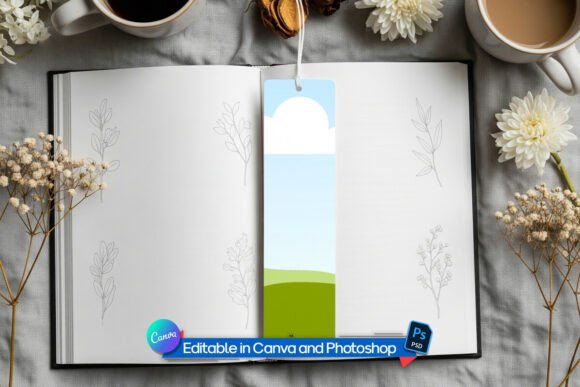
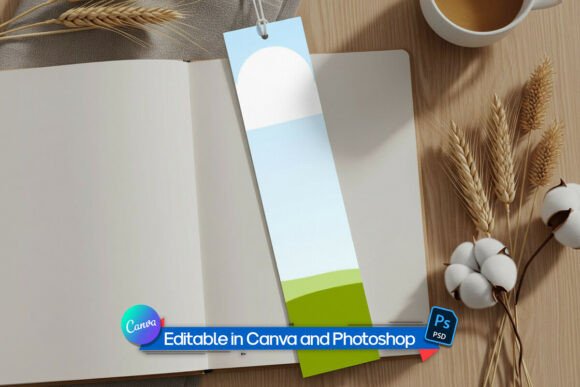
A bookmark mockup is a digital template that allows you to showcase your design on a realistic representation of a physical bookmark. These mockups are typically high-resolution images or layered files that simulate the look and feel of a real bookmark. They often include paper textures, lighting effects, and drop shadows to create a natural and professional appearance.
The Page Flag Bookmark Mockup is particularly popular because it features a perfect 2:9 ratio, which is the standard size for most bookmarks. This makes it ideal for designers who want to present their patterns, illustrations, or branding concepts in a way that closely resembles the final product.
Why Use a Bookmark Mockup?
There are several reasons why using a bookmark mockup is beneficial for both beginners and experienced designers. Let’s take a closer look at some of the key advantages:
- Professional Presentation: A well-designed mockup gives your work a polished and professional look, making it more appealing to potential clients or customers.
- Time-Saving: Instead of creating a physical prototype, you can use a mockup to quickly test and present your designs.
- Versatile Use: Mockups can be used for various purposes, including social media posts, website banners, product listings, and marketing materials.
- Easy Editing: Many mockups come with editable layers, allowing you to customize the design easily without needing advanced design skills.
Key Features of the Page Flag Bookmark Mockup
The Page Flag Bookmark Mockup stands out from other mockups due to its range of features that cater to different design needs. Here are some of the most notable ones:
Perfect 2:9 Ratio Design
This mockup is specifically tailored for the popular 2”x9” bookmark size, which is widely used by authors, publishers, and stationery brands. The exact dimensions ensure that your design looks proportionate and realistic when presented in the mockup.
Editable in Photoshop and Photopea
For those who prefer working in Adobe Photoshop or the free online alternative, Photopea, the mockup comes with a layered PSD file. This means you can easily drag and drop your design into the mockup, and the perspective and texture will be automatically applied. This feature makes it simple for even novice users to create a professional-looking presentation.
Canva-Compatible Template
If you're not familiar with Photoshop, the Page Flag Bookmark Mockup also includes a ready-to-use Canva template. This is perfect for users who want to create mockups without any technical barriers. Just upload your pattern or artwork, and insert it into the frame with ease. This feature is especially useful for Etsy sellers and small business owners who need quick and easy access to design tools.
Transparent PNG File Included
The mockup also provides a high-resolution transparent PNG file with natural lighting and shadows. This file is ideal for quick edits and is compatible with any design software. It allows you to place the mockup on any background, giving you greater flexibility in how you present your design.
Realistic Professional Aesthetic
One of the standout features of this mockup is its realistic professional aesthetic. It includes true-to-life paper textures, subtle drop shadows, and crisp lighting that enhance the overall visual appeal. This helps your design stand out and gives it a high-end feel that can attract more attention from your audience.
Who Can Benefit from Using a Bookmark Mockup?
The Page Flag Bookmark Mockup is a versatile tool that can benefit a wide range of professionals and creatives. Let’s take a look at some of the groups that can find value in using this mockup:
Surface Designers
Surface designers often create patterns, textures, and illustrations that are used on products like fabric, wallpaper, and stationery. A bookmark mockup allows them to showcase their designs in a realistic context, helping potential buyers visualize how their patterns would look on a finished product.
Authors and Publishers
Authors and publishers can use bookmark mockups to promote their books or series. By displaying custom-designed bookmarks, they can add a unique touch to their marketing materials and create a cohesive brand identity.
Stationery Brands
For stationery brands, a bookmark mockup is an excellent way to present new products or collections. It allows them to show off their designs in a professional manner, whether for packaging, social media, or online store listings.
Etsy Sellers
Etsy sellers who offer handmade or printable bookmarks can use mockups to create eye-catching product listings. High-quality mockups can increase the perceived value of their products and encourage more sales.
How to Get Started with the Page Flag Bookmark Mockup
Getting started with the Page Flag Bookmark Mockup is straightforward. Here are a few steps to help you begin:
- Download the Mockup: Visit the official source or marketplace where the mockup is available and download the files. Make sure to check the license agreement to understand how you can use the mockup.
- Open the File: If you’re using Photoshop or Photopea, open the layered PSD file. For Canva users, import the provided template into your Canva project.
- Edit Your Design: Replace the placeholder image with your own artwork or pattern. Adjust the colors, textures, and layout as needed.
- Export and Share: Once you’re satisfied with the design, export the mockup in your preferred format (e.g., PNG, JPEG) and share it on your website, social media, or online marketplace.
Common Misconceptions About Bookmark Mockups
Despite their usefulness, there are still some misconceptions about bookmark mockups that might prevent people from using them. Let’s address a few of these:
Misconception 1: “Mockups are only for professionals.”
Reality: While mockups can certainly benefit professionals, they are also accessible to beginners. Many mockups, including the Page Flag Bookmark Mockup, are designed to be user-friendly and require minimal design experience.
Misconception 2: “Using a mockup isn’t necessary if I have a good photo of my design.”
Reality: A mockup adds a layer of professionalism and realism that a simple photo may not achieve. It helps your design stand out and can make a significant difference in how it’s received by your audience.
Misconception 3: “Only physical bookmarks are valuable.”
Reality: Digital mockups are just as valuable, especially in the online marketplace. They allow you to showcase your designs in a way that’s both cost-effective and visually appealing.
Conclusion
The Page Flag Bookmark Mockup is a powerful tool that can help you present your designs in a professional and visually appealing way. Whether you’re a surface designer, author, stationery brand, or Etsy seller, this mockup offers a range of features that make it easy to showcase your work with style.
By using a bookmark mockup, you can elevate your brand, attract more customers, and create a cohesive visual identity across all your marketing channels. So, don’t wait—start exploring the possibilities of the Page Flag Bookmark Mockup today and take your design presentations to the next level.